Apps for Teachers: Free Tools Sorted by Job
Updated · Written to our editorial standards
Most lists of apps for teachers are a wall of logos. Sorting them by the job they do is more useful, because you rarely need two apps for the same job, and every extra app is another login for a class of children, another privacy review, and another password to reset on a Monday morning. This guide covers four jobs — making materials, checking understanding, talking to families, and producing printable practice — names the free apps teachers use for each, and is plain about where each one falls short.
Product details were read off each company's own pages on 2 October 2026. Class hubs, video platforms and the question of who approves a tool are covered in the companion guide to free online teaching platforms.
Pick the job first, then the app
The rule that keeps a classroom's app list short is one app per job. Before adding anything, name the job it does and check whether something you already use does it well enough. The table lists the jobs most teachers end up filling, with the free option teachers most often reach for.
| Job | Free app | What the free version gives you |
|---|---|---|
| Design slides, posters and newsletters | Canva for Education | Canva's premium features, free for eligible K–12 teachers and the students they invite |
| A quiz that marks itself | Google Forms | Quiz mode with an answer key, points per question and automatic feedback |
| A live quiz game | Kahoot! | The free Kahoot! Go plan; paid individual plans start at $3 a month, billed annually |
| A self-paced quiz game | Wayground (formerly Quizizz) | Free sign-up for teachers |
| Messages to families | Remind or ClassDojo | Free two-way messaging with translation (Remind: 90+ languages; ClassDojo: 190+) |
Making materials: Canva for Education
Canva for Education is Canva's plan for schools, and for eligible teachers it is free: Canva's premium features, thousands of templates for any subject or grade, sharing work with students, and connections to class hubs including Google Classroom, Microsoft Teams, Canvas and Moodle. It is the reason so many classroom slides and newsletters share a look.
Eligibility is narrower than "teachers". According to Canva's help centre on 2 October 2026, you qualify if you currently hold one of these roles:
- A certified K–12 teacher at a formally accredited school, in a teaching position now
- A certified K–12 school librarian, learning support assistant or curriculum specialist
- A certified teacher at a technical or vocational school serving primary or secondary students
The same page lists who does not qualify, and it is worth reading before you plan around the free plan: parents, preschool or daycare assistants, public librarians (as opposed to school librarians), homeschool educators who are not licensed or employed by a K–12 school, teachers not currently in a teaching position, and colleges and their students. Signing up with a recognised school email address gives access straight away; otherwise you upload a document showing your name, school and teaching position. Students join only by a teacher's invitation, and Canva notes that teachers need parental consent for children under 13 — the age line drawn by the federal children's privacy rule described in the FTC's COPPA guidance.
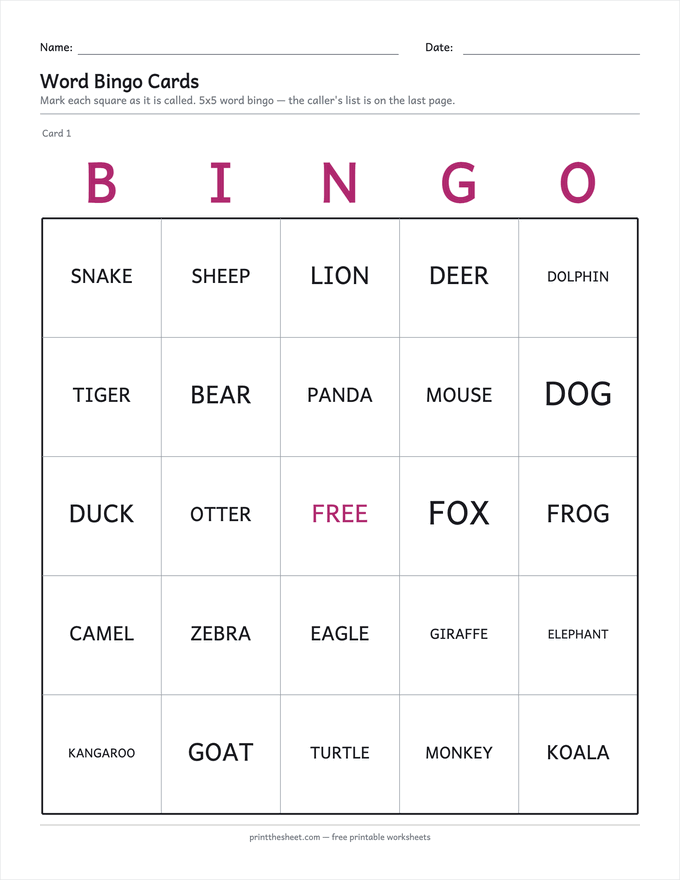
Where a design app is the wrong tool is anything whose content has to be right. A bingo template is a blank grid you fill and shuffle by hand, card after card; a generator fills it, shuffles every card differently, and prints the caller's list. The bingo card generator does exactly that, the flashcard maker lays out double-sided cards that line up when printed, and the word cloud generator packs a word list into a shape a class can colour. No account, and nothing for a parent or homeschooler to qualify for.
Checking understanding: quizzes and games
Google Forms is the quiet workhorse here. Turn on quiz mode, mark the right answers, set points, and add feedback, and it marks every response for you; you choose whether students see their score, the questions they missed, and the correct answers (Google's own help pages, 2 October 2026). Results land in a spreadsheet, which is where most teachers want them anyway.
The most useful screen in Forms is the one teachers skip: the automatic summary of a quiz's responses, which includes the questions most often missed. Five questions at the end of a lesson, a glance at that summary, and you know what to reteach tomorrow before anyone has handed in homework built on the misunderstanding.
Kahoot! runs live quiz games on a shared screen. Its free plan is called Kahoot! Go; on 2 October 2026 its paid individual plans started at $3 a month billed annually ($36 a year). Its plans page also notes that, because of data-protection rules, students under 16 cannot answer free-form question types such as word clouds and open-ended prompts on the free plan. Wayground, the company formerly called Quizizz, offers a free teacher sign-up and is often used for self-paced quizzes students take on their own devices.
One caution applies to every game with a countdown: when points reward speed, the fastest readers win, and that tells you little about what a slower, careful child knows. Use the games for review and energy. For finding out what each student understands, a self-paced quiz or a paper exit ticket gives you cleaner evidence.
Talking to families: one app, not three
Remind offers free two-way messaging that families can read in more than 90 languages, and it is now part of ParentSquare. ClassDojo describes itself as free for teachers, forever; its messages are translated automatically into more than 190 languages, and it adds Stories, a private class feed of photos and updates, and student Portfolios (both companies' own sites, 2 October 2026).
Either works. What does not work is three of them. Families with children in several classes can end up juggling a different app for each teacher, so if your school or team already uses one, use that one too, even if you prefer another. And keep anything sensitive, such as a grade dispute, a behaviour concern or a health matter, for a phone call or the school's official channel rather than a class feed.
Running the room: timers and routines
The smallest classroom apps often earn the most use. A countdown timer on the board ends more transitions on time than any reminder, and a fair way to pick names keeps cold-calling from landing on the same three hands. ClassDojo bundles tools like these, from attendance sheets to timers, in what it calls its Teacher Toolkit, so a class already on ClassDojo for messaging does not need a separate app for them.
Whatever you use, put it on the screen the class can see. A timer only the teacher can see is a reminder for the teacher; a timer on the board is a routine the whole room follows, and routines are what make a lesson run without constant prompting.
A short audit before adding an app
Five questions sort the useful app from the one that becomes a chore by October:
- Does it do a job nothing you already use does well enough?
- Has your school or district approved it for student use? The approval process is covered in the platforms guide linked above.
- Can you export what you make if the app changes its free plan or closes?
- Does it work for a child with no device at home, or is there a paper fallback?
- How many of the youngest students can log in without help?
The last two questions are why printables stay in the mix even in a well-equipped classroom. A sheet works with no login, no charger and no Wi-Fi, which makes it the backup for every app on this page.
Frequently asked questions
Is Canva free for teachers?
For eligible K–12 teachers, yes. Canva for Education gives certified teachers at accredited schools, and the students they invite, Canva's premium features at no cost, according to Canva's help centre on 2 October 2026.
Who is not eligible for Canva for Education?
Canva's help centre lists parents, preschool or daycare assistants, public librarians, homeschool educators who are not licensed or employed by a K–12 school, teachers not currently teaching, and colleges and their students as not eligible.
Is Kahoot! free for teachers?
Kahoot! has a free plan called Kahoot! Go. On 2 October 2026 its paid individual plans started at $3 a month, billed annually.
What happened to Quizizz?
Quizizz renamed itself Wayground. The old quizizz.com address now redirects to wayground.com, whose homepage reads "Quizizz is now Wayground".
Which app should I use to message parents?
Whichever one your school or team already uses. Remind and ClassDojo both offer free messaging with translation; families do best with one app across all their children's classes.